Setting Up OpenClaw Securely to Automate My Daily Workflows
TL;DR: How I securely set up OpenClaw (formerly ClawdBot) to automate my daily workflows via Telegram. This should be helpful for both technical and non-technical users who want to set up their AI agents without exposing their network to the entire internet.
The Evolution: From Chatbots to Autonomous Agents
I was an early adopter of LLMs. I was using AI for fun when the first ChatGPT version came out in 2023. It was cute and quite unreliable. The answers seemed very AI-like (Duhh!). The code wasn't good enough; it lacked autonomy and was prone to hallucinations and content limitations.
Since then, the LLM space has evolved into the most economically significant field of our time, disrupting entire ecosystems in its wake. We watched stocks fluctuate wildly, saw a surge in the demand for data-centre resources, and witnessed an explosion of AI summits. Today, AI is no longer a luxury; it is a non-negotiable entity in our daily workflows. It has become a master at organising unstructured text and synthesising patterns across diverse "information blobs." It can make sense out of any text. It can be nonsense, but it shall make sense.
However, it has only made us more capable than before. I'd argue that the nature of our output has not changed, yet the methodology has evolved completely. We're seeing a true shift in the mental model of how AI integrates with our daily work.
With current frontier models, the way we work has changed permanently. AI agents have evolved beyond base models; they are now autonomous extensions capable of wielding tools, accessing specialized skills, and retaining long-term memory. They can collaborate, delegate tasks, and even manage entire software projects when steered by a clear context-engineering strategy. The semi-deterministic nature of these agents provides a unique flexibility to our workflows—allowing for creative interpretation while remaining anchored by clear instructions. They have enough logic to stick to their goal, but enough imagination to navigate around unexpected obstacles. If Path A fails, the probabilistic nature of the model suggests Path B might work.
The new shift in LLM-based AI is its context. With better context and persistent memory, it can provide truly surprising results.
Commonly, a prompt that worked for someone might not work for you if the context is limited or poorly described. I will write more about that in another article. But this one is about OpenClaw. This project changed the way I think about AI agents entirely.
By now, you're definitely familiar with OpenClaw (formerly ClawdBot, and briefly Moltbot). It can be a bit spooky and intimidating for non-technical users to get started, especially with the flood of articles on security threats. Unfortunately, the warnings are true. It can be a security nightmare, but not so much if you have it under control and don't hand over the keys (pun intended) to your life.
I am not going to hype OpenClaw more than it already is, but a tiny intro is due.
OpenClaw is a sleek AI agent infrastructure—a software system for deploying and orchestrating AI agents that automate complex tasks and communicate through various channels. It enables agents to interact with web browsers, manage diverse messaging platforms, execute shell commands, and integrate with a wide array of external services.
It was created by Peter Steinberger, an Austrian developer, as a side project back in November 2025. The project was open-sourced, went incredibly viral, and now sits at the top of GitHub. In fact, it blew up so fast that recently, Steinberger joined OpenAI, and OpenClaw was moved into an independent open-source foundation to keep the "lobster" free and open [1]. We even saw the crazy launch of Moltbook, a social network exclusively for these AI agents to talk to each other [2].
It's so many things, but what stood out to me was its baked-in autonomy. It basically lives on your machine and does things for you while you are away, like a personal operating system that you control via your messaging app. You can develop new AI agents on the fly via prompting and add required skills and tools.
What makes OpenClaw better than other frameworks?
- On-the-fly Agent setup: You can make agents by merely prompting them into existence.
- Proactive Heartbeats: Most AI agents are reactive; they sit idle until you type a prompt. OpenClaw has a "Heartbeat" function. It wakes up on its own to perform background tasks or check if you need anything.
- Multi-channel Gateway: Most frameworks lock you into their own UI. OpenClaw acts as a message router, letting you connect to agents via Telegram, WhatsApp, Discord, Slack, and iMessage.
- Persistent Memory: It remembers everything across sessions, getting smarter the longer you use it. Your interactions are saved as Markdown files (like MEMORY.md) locally on your machine. When you first set up OpenClaw, it asks basic questions: your name, timezone, and your preferences. What makes it remarkable is how it continues learning as you communicate. The system notices patterns in your behaviour. This contextual understanding accumulates over time, making the assistant increasingly personalised to your specific workflows.
- Privacy Control: If you have a powerful machine (like an M4 Mac Mini), you can run models locally (via Ollama or LM Studio), meaning your data never leaves your hardware.
My Goal
My idea was to experiment with OpenClaw and connect it to a couple of side apps I was building, which I could control via Telegram.
Remember: OpenClaw is infrastructure running via an LLM. Do not give it root access unless you have a dedicated, sandboxed machine with no personal API keys or sensitive information.
Here is the setup:
- A dedicated laptop running OpenClaw as a daemon, always on (my server).
- Tailscale for secure, zero-config access to the OpenClaw dashboard from anywhere on my tailnet, no port forwarding, no VPN config and no public exposure.
- Control my habit monitor and personal finance app via Telegram.
- Save new links, books, and PDFs to my Notion database in the right category.
We need to lock down the machine so the agent can't get out of hand, and so a hacker from Hawaii can't instruct your agent to go rogue (Prompt Injection is a real threat [3]). Also, do not provide your original, primary email when testing.
OpenClaw's behaviour is model-dependent. While sophisticated tasks require "reasoning" models, simple workflows are well-supported by lightweight models. For simple use cases, models like Claude 3.5 Haiku, Kimi 2.5, or Gemini 2.5 Flash are alright. If you notice the agent breaking the workflow or failing complex logic, switch to a frontier model like GPT-4o, Claude 3.5 Sonnet, or Gemini 3.1 Pro.
Skills: The Infinity Stones of OpenClaw or any AI agent
Skills are the new lightweight agents. They give your agent context to work with.
Imagine your OpenClaw agent is Tony Stark. By itself, the agent is brilliant, but he is just a smart guy in a workshop. He has the potential to do anything, but he needs the right suit for a specific mission. Skills are like his suits (or, to mix Marvel metaphors, the Infinity Stones).
- Our base model: This is Tony. He can think, strategise, and crack jokes.
- Example "web-scraper" skill: This is the Hulkbuster suit. It's heavy-duty, built for one specific purpose (smashing through anti-bot walls and extracting data), and has specialised tools.
When you create a Skill, you're building a knowledge package with instructions, best practices, and guidance for a task. Download it, drop it into OpenClaw's skills folder, and whenever you mention a relevant task, OpenClaw automatically uses that reference guide. You can find pre-built skills at ClawHub or easily prompt the agent to write one for you with some context.
Phase 1: Securing the Server (Before Installation)
Before we install OpenClaw, we need to lock the doors of our machine's network and create a secret backdoor for you using Tailscale.
Step 1: Install Tailscale
Tailscale creates a private mesh network that only your paired devices can see.
Run this on your server:
curl -fsSL https://tailscale.com/install.sh | sh
sudo tailscale up
Check your new private IP address (it will start with 100.x.x.x):
tailscale ip -4
Step 2: Auto-Updates & Disable IPv6
We'll set the machine to update itself and turn off IPv6 to reduce the attack surface.
sudo apt update && sudo apt install unattended-upgrades -y
sudo nano /etc/sysctl.conf
Paste these at the bottom to disable IPv6:
net.ipv6.conf.all.disable_ipv6 = 1
net.ipv6.conf.default.disable_ipv6 = 1
Step 3: Harden SSH
Move the SSH door from the default Port 22 to a hidden spot, and disable passwords.
sudo nano /etc/ssh/sshd_config
Change these lines:
Port 2222
ListenAddress 100.x.x.x  # Use your Tailscale IP here!
PasswordAuthentication no
PermitRootLogin no
Restart SSH:
sudo systemctl restart ssh
Step 4: Enable the Firewall (UFW)
Block everything coming in, except your Tailscale tunnel.
sudo ufw default deny incoming
sudo ufw enable
The final result of this process is a setup with no public SSH or web ports, making the server reachable only via your private Tailscale network.
Phase 2: OpenClaw Installation
Follow the official instructions at docs.openclaw.ai to install the core package. Once installed, run the setup wizard:
openclaw onboard
The Configuration Walkthrough:
- Risk Acknowledgement: "I understand this is powerful and inherently risky." → Type "Yes"
- Onboarding Mode: Select Manual
- Setup Target: Select Local gateway (this machine)
- Workspace Directory: Accept the default (
~/.openclaw/workspace) - Model/Auth Provider: Select your preferred provider (e.g., Anthropic, Google, OpenAI) and paste your API key.
Gateway & Networking Setup:
Now we define how our agents talk to the outside world. This is crucial:
- Gateway port: Keep default (18789).
- Gateway bind: Set to
Loopback (127.0.0.1). This keeps the agent locked to your local machine. It prevents outside traffic from accessing your agent's unauthenticated local web UI [4]. - Tailscale exposure: Keep this Off for your first setup. Only use
tailscale servelater if you want web dashboard access on your Tailnet. Never use Tailscale Funnel for OpenClaw.
Setting Up Telegram Channel Configuration:
- In the Select channel step, use the arrow keys to select
Telegram (Bot API)and press Enter. - On Telegram, search for
@BotFatherand send/newbotto generate an API Token. - Paste the token into the OpenClaw terminal when asked for your channel configuration.
- Device Pairing: Send a message to your new bot. OpenClaw will ask you to approve the pairing in the terminal to establish trust.
The Anatomy of an OpenClaw Agent
Your agent's brain is just a folder of Markdown files. It's beautifully simple to hack:
- SOUL.md: The agent's core persona, tone, and strict boundaries.
- IDENTITY.md: Technical identity (name, emoji, theme).
- USER.md: Information about you. Keep this vague until the agent passes your vibe check.
- AGENTS.md: High-level rules for memory and social heuristics.
- TOOLS.md: Tactical advice on how to use system tools (read/write, exec, web_search).
- HEARTBEAT.md: Background tasks. This is what the agent checks every cron interval (e.g., scanning Telegram or scraping a site).
You can edit these files based on what you want your agent to do. Iterate based on what works and evaluate the agent's performance over time. The agent will update its knowledge based on what it learns. This is nothing to do with fine-tuning the base model, but merely adding more context.
The Power of Positive Prompting:
Avoid negative prompting. Models struggle with "Don't" commands.
| Bad (Negative) | Good (Positive) |
|---|---|
| "Don't include elephants in the image." | "Only include fields that contain a value." |
| "Don't upload files without asking." | "Always request explicit approval before uploading any files. Only proceed once you receive a clear 'Yes' from me." |
| "Don't send messages after 11 PM." | "Only send non-urgent messages between 9 AM and 11 PM." |
| "Don't delete files." | "Read files only. Never modify or delete any file unless I explicitly say 'delete'." |
Building my first AI agents within OpenClaw
Linky: The Knowledge Base Manager
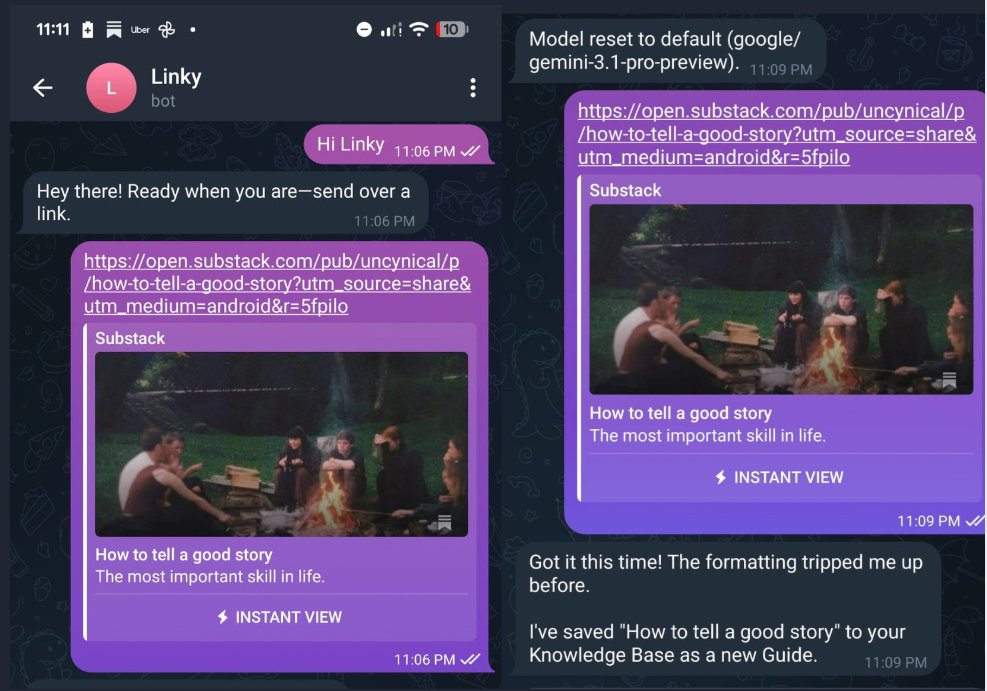
I created "Linky" to manage my scattered Notion databases and local CSVs. When I send a link to Linky on Telegram, he infers the genre, description, author, and date. He then uses the Notion skill (SKILL.md) to update my database. He acts as a RAG (Retrieval-Augmented Generation) system for my notes.
I even set a cron job in his HEARTBEAT.md, so he reminds me every evening how many unread articles are in my queue. I plan to edit his SOUL.md soon to let him cross-reference arXiv papers for essay research. To set up a cron job, all you have to do is ask the agent to remind you at a particular time. If you want it to remember something, you tell it. As simple as that.
Cashy: The Finance Tracker
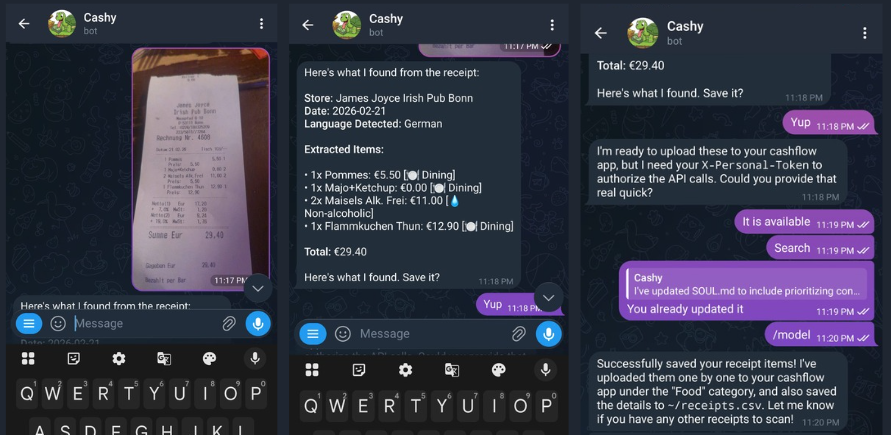
Cashy connects to a personal finance web app I vibe-coded. I just snap pictures of receipts and bills, send them via Telegram, and Cashy processes the image, categorizes the expense, and hits my tracker's API endpoint to log it automatically.
It is not perfect
Despite clear instructions and strictly defined skills, it still fails to do its job. This can happen and is usually solved by asking again. The agent crashes, you might hit an API request limit, or sometimes the agent just doesn't manage to do what you wanted it to do. Doesn't mean you have to give up early. Getting the results you want requires iterations. You have to be direct and clear about what you want and be sure of your intent.
Prompting and directing AI agents can also help you improve your communication and critical thinking skills. Try making your own skills for OpenClaw to use. You have to know exactly what you want to get for any AI agent to become good at its job.
The Compound Effect
I've been running this setup for a few weeks now. Seriously, if you're just starting, just have conversations with it first. Ask it to summarise articles or check the weather. If you are not from a technical background, then you should definitely take it slow. Check for tips and ideas on automating your workflows and how AI agents can help you be more efficient. Write them down and draft the required content for the agent to execute the task. Set up the workflow, ask the OpenClaw agent to identify edge cases and brainstorm with the agent to build tools and skills that can bypass these edge cases. This is what I did when I wrote the skills for the agent to access my finance tracker app.
But what makes OpenClaw more than a simple chatbot is how it accumulates context. Here's what's different for me now:
- It knows my writing style.
- It knows which routines I am following are completed and which are overdue.
- It knows I work late and not to bother me with non-urgent heartbeats after 11 PM.
None of this was explicitly programmed. It compounded. Every correction, every "no, I meant it this way," built an agent that genuinely knows how I work.
The people who start building this context and workflow now are going to have a massive head start. This is set to change the way we perceive AI agents.
References:
[1] Trending Topics: "OpenClaw Developer Peter Steinberger Joins OpenAI; His AI Agent Will Stay Open Source" (Feb 16, 2026)
[2] Wikipedia: "Moltbook" (Mar 2026)
[3] Cisco Blogs: "Personal AI Agents like OpenClaw Are a Security Nightmare" (Jan 28, 2026)
[4] Kaspersky Official Blog: "New OpenClaw AI agent found unsafe for use" (Jan 21, 2026)